LASER Conveyor: Avatar Virtual Printer for LivestreamingA free TikTok LIVE game that prints and laser-engraves your viewers' profile pictures, on screen
By Matterlane Studio
Prism Press prints viewer profile pictures on digital paper. Ember Forge simulates laser engraving them on wooden plaques and portraits. There is no physical printer or laser. Viewers take part for free with comments, follows and shares, and gifts can unlock larger or special artwork.
Real screens from LASER Conveyor 1.2.0 running its Offline Simulator. The viewers are fictional and marked SIMULATION.
Quick answer
What is LASER Conveyor?
LASER Conveyor is a free Windows desktop app that turns TikTok LIVE viewer activity into virtual artwork. When a viewer comments, follows, shares or sends a gift, their TikTok profile picture is printed in Prism Press or engraved in Ember Forge, on screen, with their display name.
It reads your LIVE's activity through TikFinity Desktop on the same PC and draws everything in a portrait LIVE Output window that you capture in TikTok LIVE Studio. You run it from the Operator Console.
Price
Free
Platform
Windows 10 or 11 PC (64-bit)
Version
1.2.0
Package
Portable ZIP, no installer
Hardware
None. No printer or laser
Works with
TikFinity Desktop and TikTok LIVE Studio
Activation
Free code from the Matterlane Studio Discord
Developer
Matterlane Studio
Two virtual attractions
Prism Press and Ember Forge
Switch modes from the Dashboard at any time. A switch waits for the current artwork to finish, and the queue carries over.
Prism Press
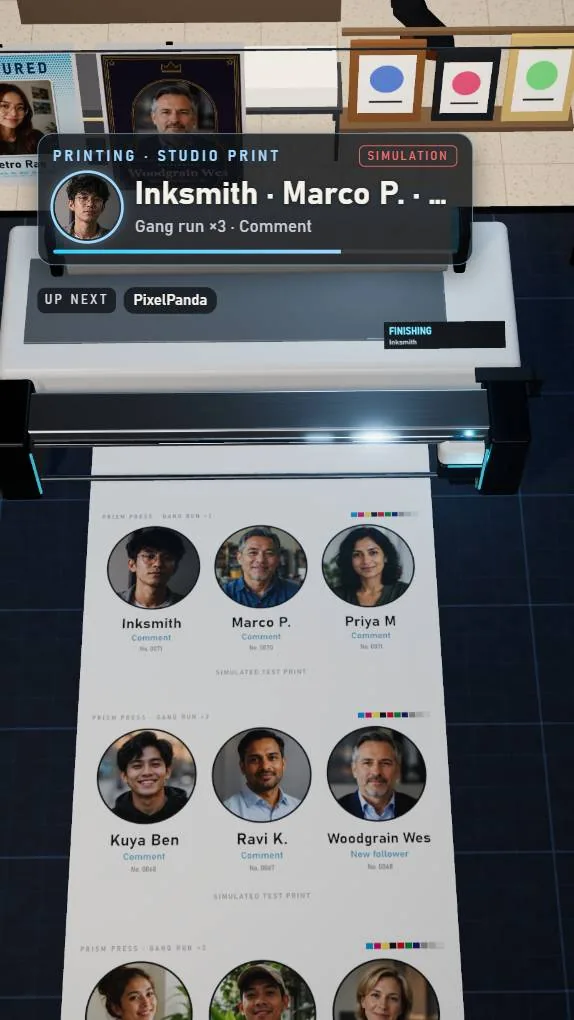
A gallery print studio. Free portraits print in a few seconds, up to three side by side on one sheet.
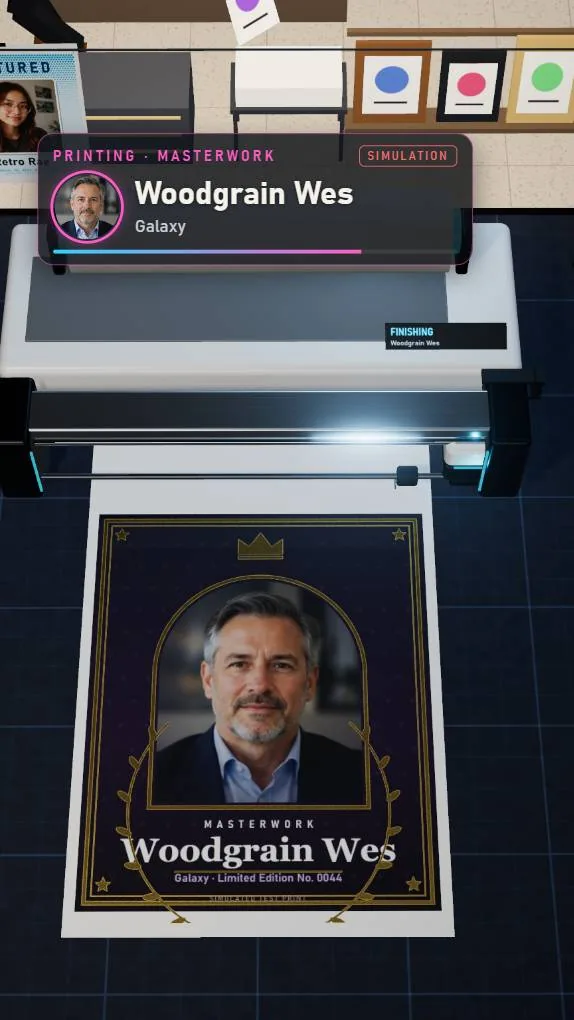
Gift rewards from Studio Print up to Gallery Frame, Foil Edition, Feature Sheet and Masterwork.
Three studios: Atelier, Pressroom and Daylight Loft.
Free portraits on one sheetA Masterwork gift reward
Ember Forge
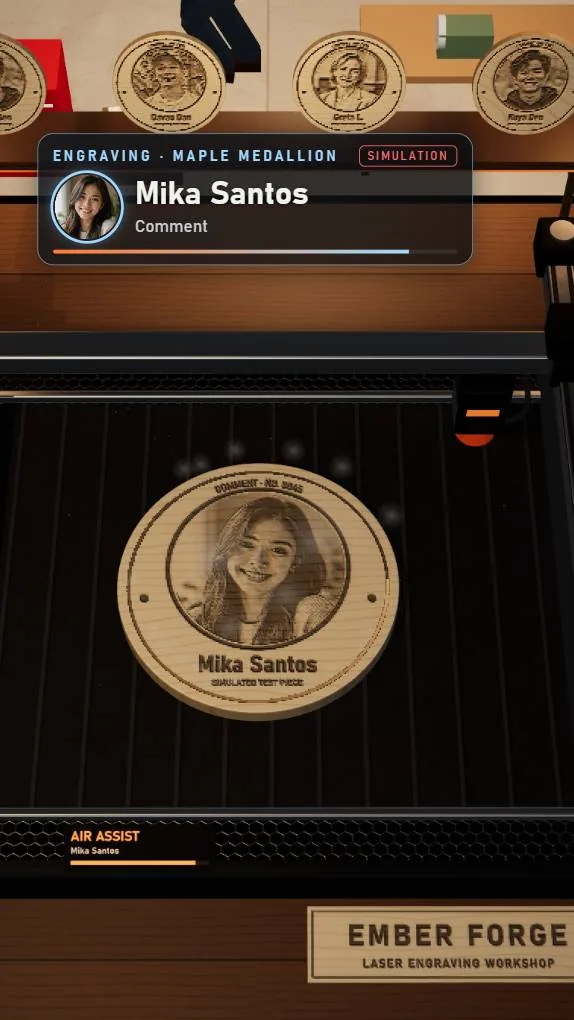
A laser engraving workshop. A simulated laser burns each portrait into light wood, then the piece joins the wall.
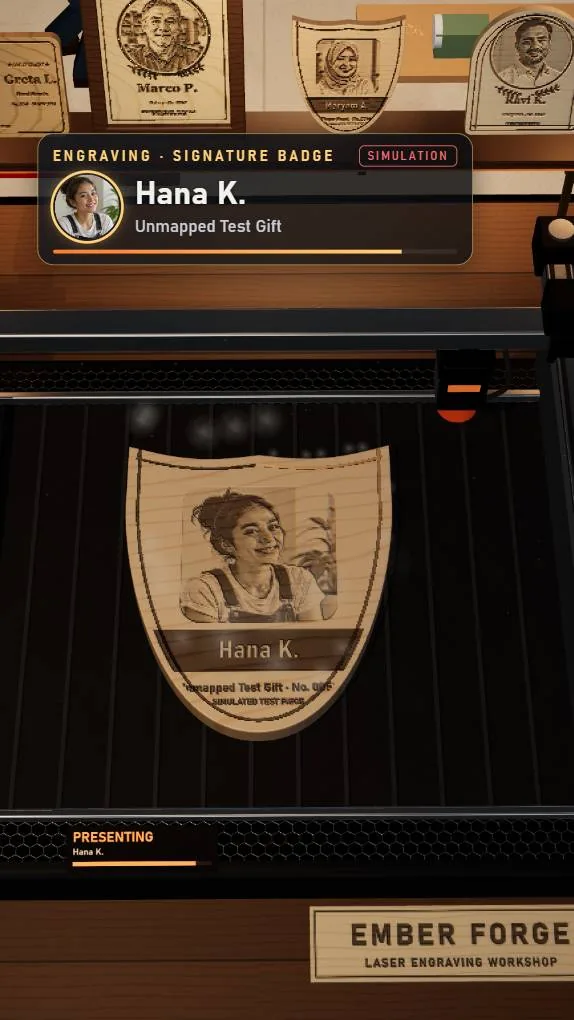
Rewards from Maple Medallion up to Signature Badge, Heritage Crest, Oak Plaque and Heirloom Frame.
Three workshops: Ember Workshop, Makerspace and Timber Barn, with Maple, Basswood, Alder, Birch and Oak.
A free medallion from a commentFinished pieces fill the wall
How viewers take part
Free actions, with optional gift rewards
Free participation
Comments (any comment, or a keyword you choose), follows, shares and a per-viewer like threshold can each earn a free portrait. Each viewer can have one free artwork waiting, then a short cooldown.
Gifts unlock bigger artwork
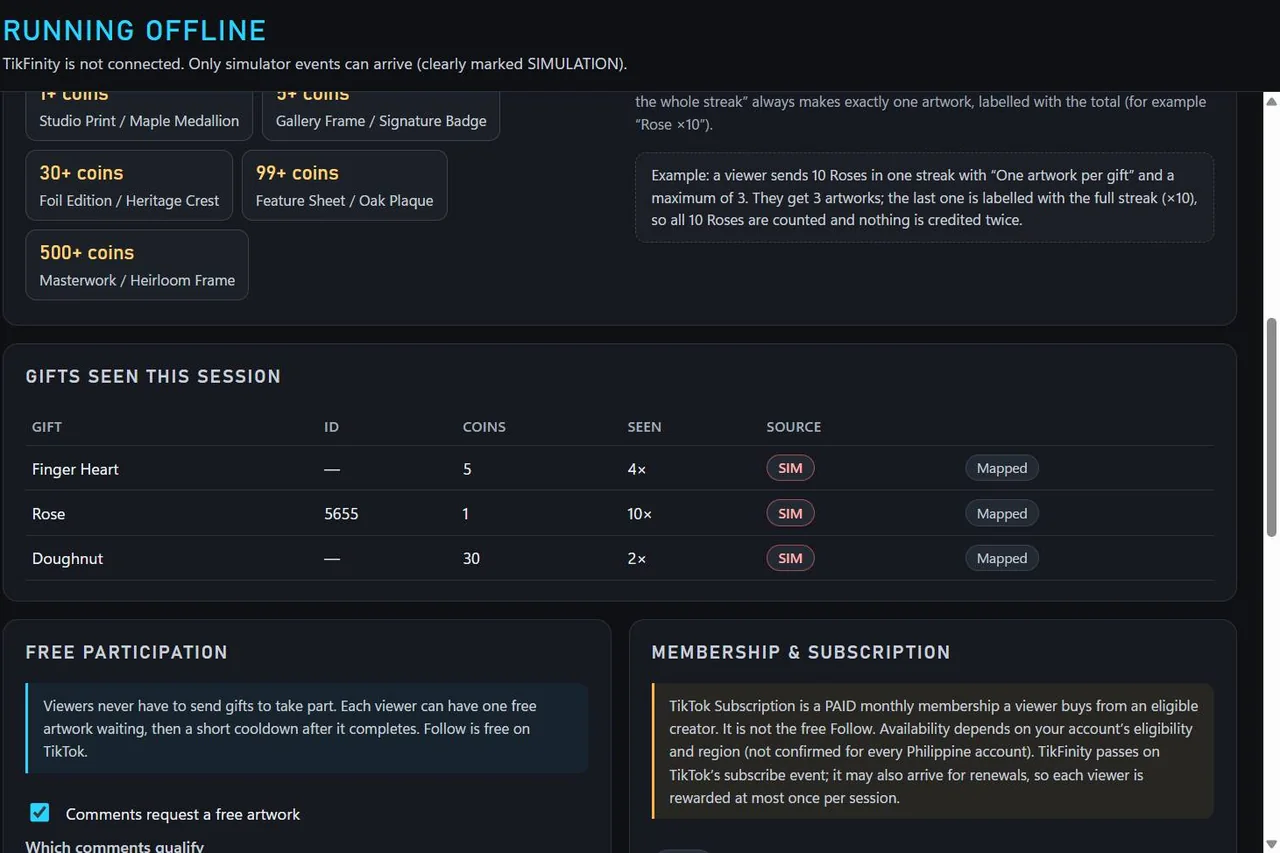
Map a gift to a reward, such as a Rose for a Studio Print, or let unmapped gifts pick a reward by coin value. Streaks can make one artwork or one per gift, up to a limit you set.
Works with Viewer Wishes
Where TikTok offers Viewer Wishes on your account, add wishes in TikTok LIVE Studio and map the same gifts in LASER Conveyor. The app reacts to the gift; it does not draw or change TikTok's bar.
Fair queue you control
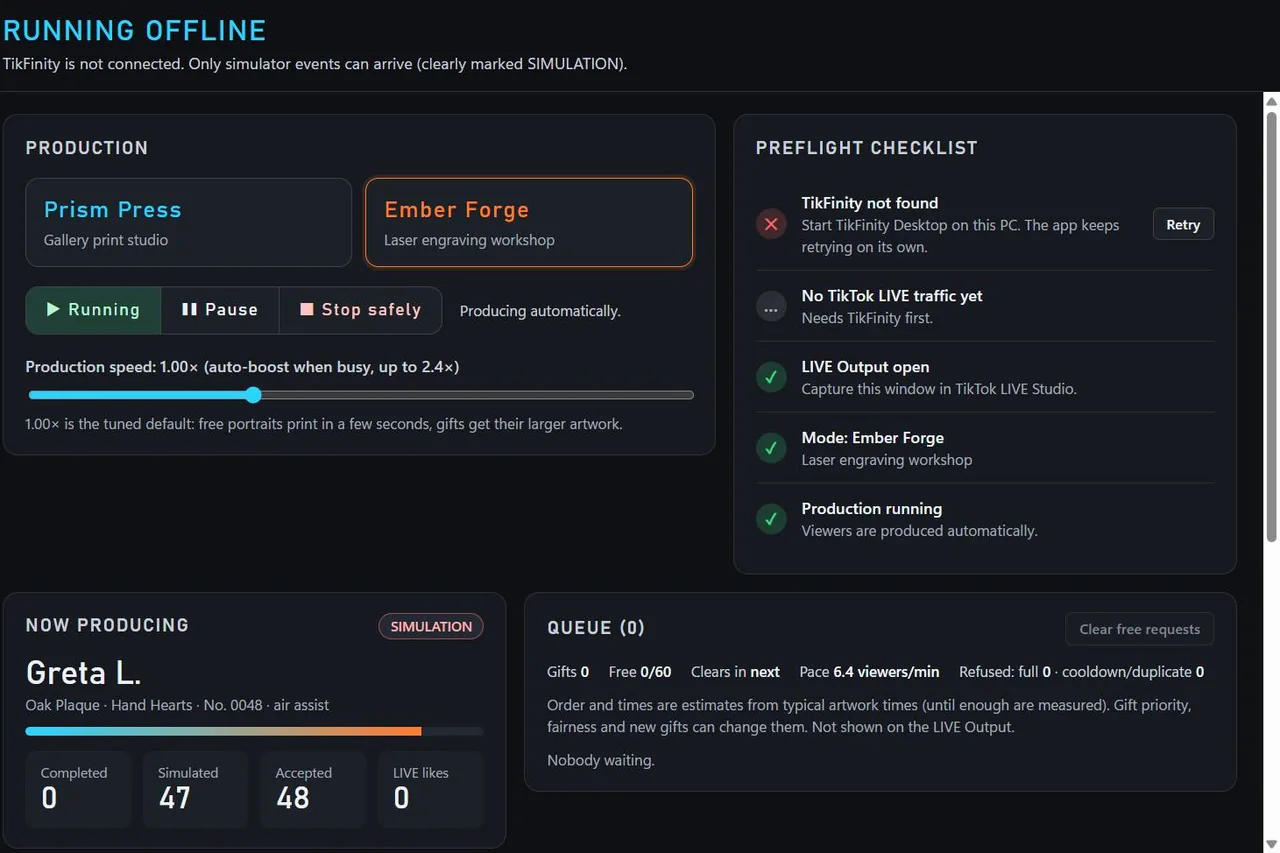
The Dashboard shows the queue, the pace and estimates for you only. Start, pause, stop safely and switch modes without losing waiting requests.
About earnings: LASER Conveyor can make a LIVE more interactive, but it does not guarantee income, gifts or engagement. Eligible creators may receive rewards from viewer gifts under TikTok's own terms, which vary by account and region. Viewers never need to spend anything to take part.
Operator Console
Run the show from one window
The console has a Preflight Checklist, gift rules, appearance and audio settings, an Offline Simulator for rehearsals and Diagnostics. A banner always says what is happening: nothing is produced until you click START PRODUCTION.
Dashboard: mode, production controls and Preflight Checklist.Interaction Rules: coin tiers, gifts seen this session and free participation.
Before you start
System requirements
Your PC
Windows 10 or 11, 64-bit. No Android, iPhone or Mac version.
Graphics with WebGL 2 (any recent GPU). Balanced and Performance quality settings help slower PCs.
About 550 MB free space for the 152 MB ZIP and the 380 MB extracted folder.
No admin rights and no installer.
Accounts and apps
TikFinity Desktop on the same PC, for LIVE comments, follows, likes and gifts.
TikTok LIVE Studio and a TikTok account that can go LIVE.
A Discord account for your free activation code.
Internet once for activation, and for every real LIVE.
Quick start
How to set up LASER Conveyor
Do this on the Windows PC you stream from, and rehearse before you go LIVE. Each step links to the details below.
Type /activate in #activation-code as shown in Discord activation, then enter the code in the app.
Connect TikFinity and set your rules
Start TikFinity Desktop, choose Prism Press or Ember Forge, and set free and gift rewards. See LIVE setup.
Open LIVE Output, capture it and click START PRODUCTION
Add the LASER Conveyor LIVE Output window to TikTok LIVE Studio as a Window Capture, then click START PRODUCTION.
Portable app
Extract, verify and launch
Download the whole ZIP from this page
Only download LASER Conveyor from this official Viberary page. The file is LASER-Conveyor-v1.2.0-win-x64-portable.zip.
Extract All before opening anything
Right-click the ZIP and choose Extract All. Do not open the exe inside the ZIP window: Windows would start it without its runtime files and it fails.
Keep the extracted folder together
The ZIP holds one folder. LASER Conveyor.exe needs every file next to it, including icudtl.dat, the .pak files, locales, resources and the DLLs. Copying only the exe fails. You can move the whole folder later.
Optional: run the package check
In the extracted folder, double-click VERIFY-PACKAGE.cmd. It uses Windows PowerShell to compare every file's size and SHA-256 with PACKAGE-MANIFEST.json and should report OK: all 78 files present and intact (LASER Conveyor 1.2.0). It only reads files, and it helps spot an interrupted copy or a file your antivirus quarantined. Like any .cmd file it is a script that runs on your PC, so only use it from a folder you extracted from this official download.
Open LASER Conveyor.exe
Double-click LASER Conveyor.exe in the same folder. It is the app itself, not an installer, and it does not need administrator rights.
If Windows SmartScreen appears
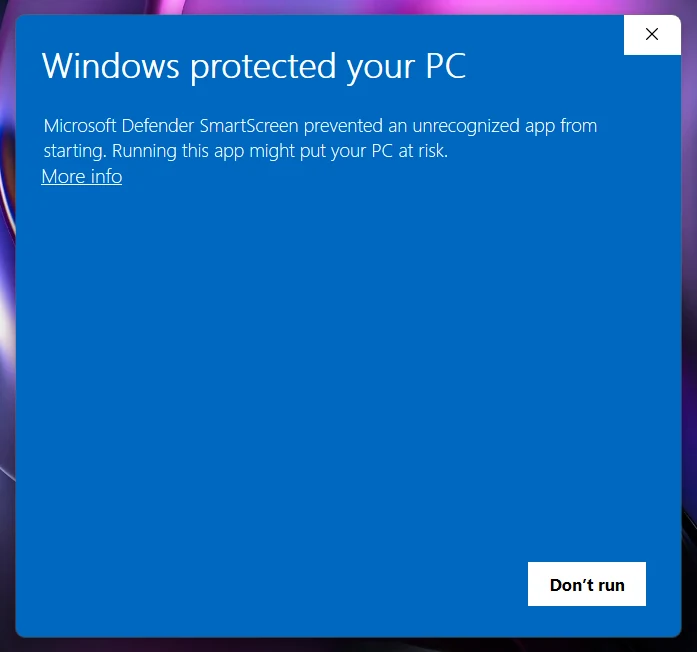
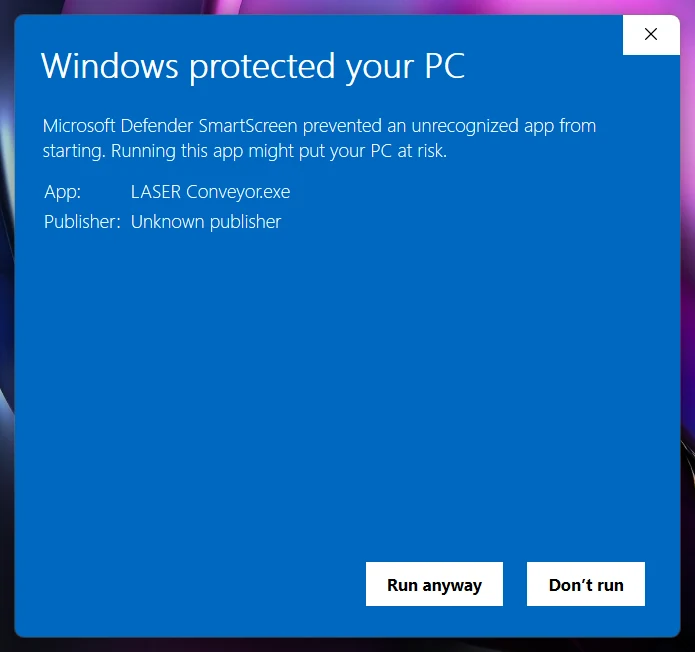
LASER Conveyor is not code-signed yet, so Windows may show Windows protected your PC and list the publisher as Unknown publisher. That is expected for an unsigned app. Before you continue, make sure the ZIP came from this page and, if you like, that its SHA-256 checksum matches. Then click More info and Run anyway. Never turn off SmartScreen or your antivirus.
1. The first warning: click More info.2. After More info: check the app name, then Run anyway.
Free activation
Get your code in Discord
The first launch shows the Activation screen. Codes are free and come from a Discord slash command, which you select from Discord's suggestions. It is not a message you post.
Join the Matterlane Studio Discord, then click the #activation-code channel
After joining, click #activation-code in the left sidebar. It is a channel name, not something to type.
Click the message box at the bottom of that channel
This is the box where Discord says Message #activation-code.
Type /activate and select the command Discord suggests
Include the leading slash. A menu appears above the box: select the /activate slash command there instead of sending the text as a message.
In the app field, select LASER Conveyor
Choose LASER Conveyor: Avatar Virtual Printer for Livestreaming from the list.
Press Enter to submit the command
The bot replies with your code in a private message marked Only you can see this. Never post your code in a channel.
Enter the code in LASER Conveyor
Type or paste the code (ML-XXXX-XXXX-XXXX) on the Activation screen and click Activate. Only this step needs the internet.
Do not type #activation-code as a message, and do not send /activate as plain text. If no command menu appears when you type the slash, check that you are inside #activation-code on the Matterlane Studio server, then try again or ask in #general.
Open #activation-code works after you have joined the server.
Activation facts
One computer per code. A code already used on another computer is refused.
Up to 3 LASER Conveyor codes per Discord member, separate from other Matterlane Studio apps.
Offline after activation. Later launches work without the internet.
Same computer, same licence. Moving the folder or extracting a newer build keeps it.
If something goes wrong
"Already used on another computer": get another code with /activate (up to 3).
Offline or service error: check your connection and try again. Nothing is used up.
No reply from the bot: make sure you selected the suggested command and the app field.
Still stuck: ask in #general on the Discord.
LIVE setup
TikFinity, LIVE Studio and Viewer Wishes
Start TikFinity Desktop on the same PC
Connect it to your TikTok account as TikFinity instructs. LASER Conveyor finds it automatically and shows TikFinity connected. Real events arrive once your LIVE is on.
Pick a mode and set your rules
Choose Prism Press or Ember Forge on the Dashboard. In Interaction Rules, choose which free actions earn a portrait and map gifts to rewards.
Open the LIVE Output
Click LIVE Output, Open. A portrait 9:16 window appears. The 1080 x 1920 native capture size gives the sharpest result.
Capture it in TikTok LIVE Studio
In a portrait scene, add Window capture and choose the LASER Conveyor LIVE Output window. Capture the app audio and add your camera as its own source.
Optional: set up Viewer Wishes
If your account has it, open Tools, Viewer Wishes in LIVE Studio and add 2 to 6 wishes, each with one gift. Map the same gifts in LASER Conveyor (Interaction Rules, Gift, Reward Mapping).
Click START PRODUCTION
Nothing is produced until you do. Rehearse first with the Offline Simulator, which locks itself as soon as real LIVE activity arrives.
Be present on camera, talk with your viewers and avoid asking for gifts mechanically. Never use extra accounts to join or interact with your own LIVE.
FAQ
LASER Conveyor questions, answered
Is LASER Conveyor free?
Yes. LASER Conveyor is free to download, free to activate and free to use. The activation code comes free from the Matterlane Studio Discord. There is nothing to buy.
Do I need a real printer or laser engraver?
No. Everything happens on screen. Prism Press is a virtual print studio and Ember Forge is a virtual laser engraving workshop. No printer, laser or other hardware is connected or controlled.
Do viewers have to send gifts?
No. Comments, follows, shares and likes can earn a free portrait, depending on the rules you choose. Gifts are optional and can unlock larger or special artwork, either by a gift you map to a reward or by the gift's coin value.
Is it an installer?
No. LASER Conveyor is a portable app in a ZIP file. Extract the whole ZIP to a normal folder and open LASER Conveyor.exe from that folder. There is no setup wizard and no admin rights are needed.
Why does LASER Conveyor.exe not start when I copy only the exe?
The exe needs every file next to it, including icudtl.dat, the .pak files, the locales and resources folders and the DLLs. Extract the complete ZIP and keep the folder together. Running it from inside the ZIP window fails for the same reason.
How do I get an activation code?
Join the Matterlane Studio Discord and click the #activation-code channel in the left sidebar. Click the message box at the bottom, type /activate and select the /activate command that Discord suggests. In the app field select LASER Conveyor: Avatar Virtual Printer for Livestreaming, then press Enter. The bot replies with your code in a private message only you can see. Do not type #activation-code as a message.
How many computers can I activate?
Each code activates LASER Conveyor on one computer. Each Discord member can get up to 3 LASER Conveyor codes. This limit is separate from Noypi Korner, RIVALS LIVE and other Matterlane Studio apps.
Does LASER Conveyor need the internet?
Activation needs the internet once. After that LASER Conveyor opens offline. Live viewer interaction still needs your internet connection, because TikTok LIVE and TikFinity Desktop run online.
Why does Windows SmartScreen warn me?
LASER Conveyor is not code-signed, so SmartScreen may say Windows protected your PC and show Unknown publisher. Download only from this official page and check the SHA-256 checksum. If it matches, click More info, then Run anyway. Do not turn off SmartScreen or your antivirus.
Can LASER Conveyor be a TikTok LIVE side hustle?
It can make a LIVE more interactive, but it does not guarantee income or engagement. Livestreaming is active work. Eligible creators may receive rewards from viewer gifts under TikTok's own rules, which vary by account and region. Viewers never need to spend anything to take part.
Is LASER Conveyor an official TikTok product?
No. LASER Conveyor is made by Matterlane Studio and is not affiliated with or endorsed by TikTok, ByteDance or TikFinity. It works alongside TikFinity Desktop and TikTok LIVE Studio, which are separate products.
Troubleshooting
Quick fixes
What you see
What to do
Nothing opens, or a debug.txt mentions ICU data
The exe ran without its folder. Extract the whole ZIP again and run VERIFY-PACKAGE.cmd.
TikFinity not found
Start TikFinity Desktop on the same PC, then click Retry.
TikFinity connected but no events
Your LIVE is not on yet, or TikFinity is not connected to it.
CONNECTED, PRODUCTION NOT STARTED
Click START PRODUCTION.
A gift did not give the expected reward
Find it under Gifts Seen This Session and click Map this gift.
Soft picture in LIVE Studio
Choose the 1080 x 1920 native capture size in LIVE Output.
Low frame rate
Set Appearance to Balanced or Performance and lower Effects.
Simulator buttons are disabled
A real LIVE is connected, so the safety lock is working.
Join Matterlane Studio on Discord
Get your free code in #activation-code with the /activate slash command, ask setup questions and meet other creators.
Optional. In Windows PowerShell, run Get-FileHash .\LASER-Conveyor-v1.2.0-win-x64-portable.zip in the folder where you saved the file. The Hash value should match the checksum above (letter case does not matter).
The ZIP contains one folder, LASER-Conveyor-v1.2.0-win-x64-portable-rc3; rc3 is the internal build label of this approved 1.2.0 release. After extracting, VERIFY-PACKAGE.cmd checks each file inside it.
LASER Conveyor is free to use, including during TikTok LIVE broadcasts where you receive gifts or rewards. Please share this official download page rather than re-uploading, repackaging, reselling or redistributing the ZIP.
LASER Conveyor and Matterlane Studio are not affiliated with, endorsed by or sponsored by TikTok, ByteDance or TikFinity. TikTok and TikTok LIVE are trademarks of their respective owners. TikFinity Desktop is a separate third-party product.
Found a problem? LASER Conveyor is actively developed and, like any software, may still contain issues. If something does not work as described, please tell us in #bug-workshop on the Matterlane Studio Discord, with your Windows version and the log from Diagnostics, Open log folder.